
Miniwave Display & Controls GuideUpdated 2 months ago
KD21C Display Manual:
Below is an overview of the KD21C display interface used on Ridewave MiniWave eBikes. This display is designed to be user-friendly while providing essential riding data at a glance.
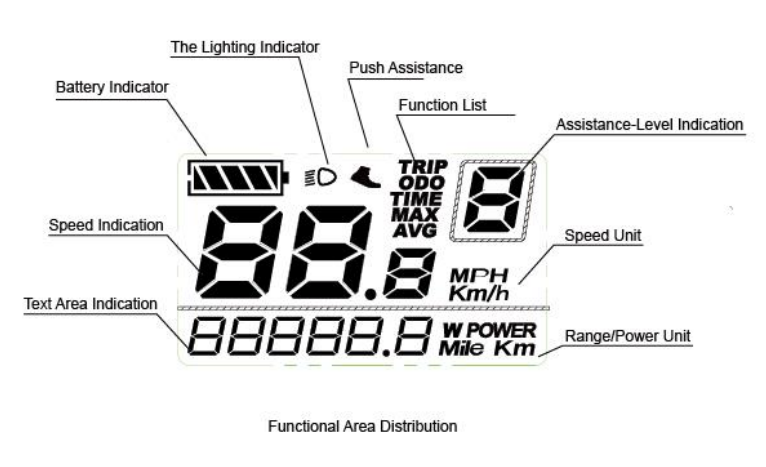
Basic Settings Overview:
To power the bike on or off, simply press and hold the middle power button.
The + button on the display increases pedal assist levels, while the – button decreases them. If you press the – button while on the lowest assist setting (level 1), you can switch pedal assist off entirely (level 0).
The bike’s headlight can be activated by holding down the + button. Moreover, the throttle and pedal assist can be used at the same time for more flexibility and control during your ride.
For safety, it’s recommended to only turn on your Miniwave once you’ve lifted your leg over the bike and are straddling the frame. Power it on just before you begin riding and only when you are prepared to do so.
If the pedal-assist system (PAS) is on and set to 1 or higher, power will be sent to the motor if the pedals are bumped or moved forward while the bike is stationary or being walked. This can cause the bike to accelerate unexpectedly, so following the recommended power-on and power-off procedure is essential for safety.
📄 Extended User Manual
For detailed instructions on using the KD21C display, you can download the extended user manual by clicking the link below:
👉 Download the MiniWave Display Manual (KD21C)
This manual includes breakdowns of advanced settings, error code explanations, and tips for optimising your display for different ride modes.
🔧 More MiniWave Resources
Looking for additional guidance?
Refer to our other MiniWave user manuals for tutorials, setup instructions, maintenance tips, and more.